How Eco-Friendly Cleaning Benefits Modern Workplaces and Smart Buildings
 Technology has transformed the way businesses operate. Offices now rely on cloud platforms, automation, smart devices, and software to improve productivity and simplify daily tasks. At the same time, companies are becoming more aware of their environmental responsibilities. This has created a growing interest in Cleansy eco-friendly cleaning, which supports healthier workplaces while complementing modern, sustainable business practices.
Just as software helps businesses become more efficient, eco-friendly cleaning uses smarter methods to achieve excellent results with less waste. Instead of relying on excessive chemicals or outdated techniques, professional cleaning companies use environmentally responsible products, advanced equipment, and efficient processes that benefit both people and the planet.
Smart Workplaces Need Smart Cleaning Solutions
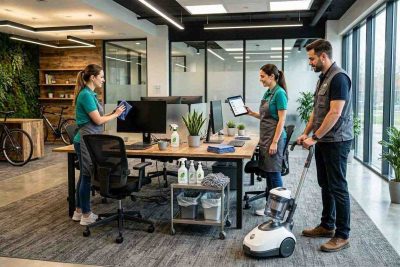
Modern offices are designed differently than they were a decade ago. Open workspaces, shared desks, collaborative meeting rooms, smart lighting, and connected devices require careful maintenance to remain clean and functional.
Eco-friendly cleaning focuses on protecting both the workspace and the technology inside it. Professional cleaners use products that effectively remove dust, dirt, and bacteria without exposing sensitive equipment or indoor environments to unnecessary chemicals.
Dust is one of the biggest challenges in technology-driven offices. Computers, monitors, printers, servers, and networking equipment can collect dust over time, affecting air circulation and overall cleanliness. While cleaning professionals do not repair electronics, they know how to safely clean surrounding work areas to reduce dust buildup without damaging valuable equipment.
Indoor air quality is another important consideration. Offices with poor ventilation or heavy chemical use may experience unpleasant odors and airborne particles that affect employee comfort. Eco-friendly cleaning products are often low in volatile organic compounds, commonly known as VOCs, helping create cleaner indoor air and a more pleasant work environment.
Many businesses also integrate cleaning schedules with facility management software. Digital scheduling systems help organize routine cleaning, monitor completed tasks, manage inventory, and coordinate maintenance without disrupting daily operations. This combination of technology and sustainable cleaning creates a more efficient workplace.
How Eco-Friendly Cleaning Uses Smarter Methods
Eco-friendly cleaning is not simply about replacing one cleaning product with another. It involves a complete approach that emphasizes efficiency, sustainability, and long-term property care.
Professional cleaners often use biodegradable products made from plant-based ingredients that effectively remove dirt, grease, and bacteria while reducing environmental impact. These products are designed to break down naturally after use, minimizing pollution compared to traditional chemical cleaners.
Microfiber cloths are another important part of eco-friendly cleaning. Their fine fibers capture dust, dirt, and microorganisms more effectively than ordinary cloths while requiring less water and fewer cleaning solutions. Because microfiber materials can be washed and reused many times, they also reduce disposable waste.
Commercial vacuum cleaners equipped with HEPA filtration systems improve indoor air quality by capturing fine dust particles, allergens, and other airborne contaminants. This is particularly valuable in offices where employees spend many hours working indoors.
Water-efficient cleaning techniques also support sustainability. Professional cleaners use equipment and methods that minimize unnecessary water consumption while maintaining high standards of cleanliness.
Many cleaning companies now rely on digital tools to improve service quality. Mobile applications allow cleaning teams to access task lists, complete inspections, report maintenance concerns, and communicate with property managers in real time. This software-driven approach increases accountability while ensuring every cleaning task is completed consistently.
Inventory management software also helps cleaning companies monitor product usage, reduce waste, and ensure environmentally responsible supplies remain available without unnecessary overstocking.
Why Businesses Are Choosing Eco-Friendly Cleaning
Today’s businesses understand that sustainability extends beyond recycling bins and energy-efficient lighting. Maintaining a healthy workplace is also part of responsible business management.
Eco-friendly cleaning helps create safer indoor environments by reducing employee exposure to harsh chemicals. Cleaner air, fewer strong odors, and lower chemical residue contribute to a more comfortable workplace, particularly for individuals with allergies or respiratory sensitivities.
Professional green cleaning also protects office furniture, flooring, glass, countertops, and other valuable assets. Gentle but effective cleaning products help preserve surfaces over time, reducing wear and extending the life of office equipment and furnishings.
Employees also appreciate working in clean, organized spaces. A well-maintained office supports concentration, improves morale, and creates a positive atmosphere that encourages productivity and teamwork.
Customers and business partners notice cleanliness as well. Reception areas, meeting rooms, and shared spaces that are consistently clean communicate professionalism and attention to detail. For businesses seeking environmentally responsible practices, eco-friendly cleaning also strengthens their corporate image.
Many organizations include sustainable cleaning as part of broader environmental, social, and governance initiatives. Demonstrating responsible cleaning practices can support corporate sustainability goals while meeting the expectations of clients, investors, and employees who value environmentally conscious operations.
When selecting an eco-friendly cleaning provider, businesses should consider more than price alone. Look for companies that use certified green products, reusable cleaning materials, HEPA filtration equipment, trained staff, and transparent quality control procedures. Reliable communication and flexible scheduling are equally important for maintaining consistent service.
As software continues to automate business processes and improve workplace efficiency, cleaning services are evolving alongside it. Smart scheduling, digital reporting, inventory tracking, and environmentally responsible methods allow cleaning companies to deliver better results while reducing their environmental footprint.
Eco-friendly cleaning demonstrates that innovation is not limited to technology alone. By combining sustainable products with modern cleaning practices and digital management tools, businesses can maintain healthier workplaces while supporting long-term environmental goals.
For organizations seeking cleaner offices, healthier employees, and more sustainable operations, eco-friendly cleaning offers a practical solution. Like well-designed software, it improves efficiency, reduces unnecessary waste, and helps create environments where people and businesses can perform at their best.